
This tutorial will show you how to maximise the structure and SEO for blogs you publish using the SEOPress Pro plugin for the best results.
Introduction to SEO in Blog Posts
Search Engine Optimisation (SEO) is crucial for ensuring that your blog post gets noticed by search engines like Google. By using the right keywords and tags, you can improve the visibility of your content and attract more readers to your blog.
Writing a WordPress Blog Post
As your site is built on WordPress, optimising your blog posts for SEO is essential for ranking well in search engines. When creating a WordPress blog post, make sure to include relevant keywords in your title, headings, and body content and image titles and alt-text. Use meta tags and descriptions to provide search engines with more information about your post.
I use SEOPress Pro on all sites I build which helps you analyse your content and provide suggestions for improving your SEO.
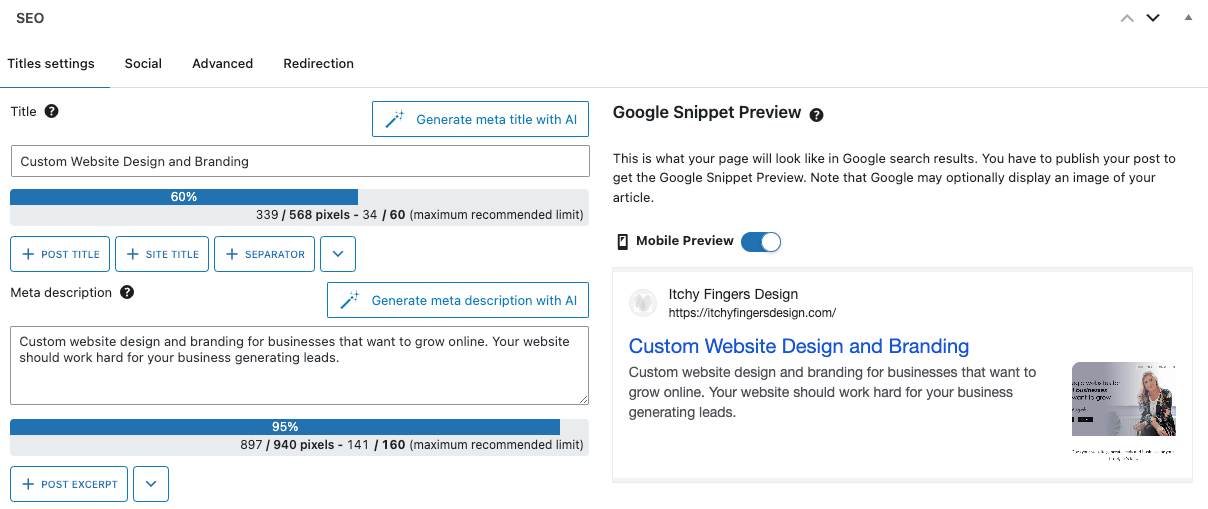
Using SEOPress Pro for SEO Optimisation
SEOPress Pro is a powerful plugin for optimizing your WordPress blog posts for SEO. With features like content analysis, schema markup, and redirection management, SEOPress Pro can help you improve your search engine rankings and drive more traffic to your blog.
When using SEOPress Pro, make sure to fill in the metadata fields with relevant keywords and descriptions. This will help search engines understand the content of your blog post and rank it accordingly.
Imagery for SEO Blog Post
Adding images to your blog post can also improve its SEO. Make sure to include alt text for each image, using relevant keywords to describe the content of the image. Images can make your blog post more engaging for readers and can also improve the overall SEO of your post.